NewNow runs on RTX 50 Series cards
Live voice changer for Windows

A new voice.
Your own delivery.

PRISM changes your voice while you talk. Your timing, your laugh and the way you lean on a word all come through in the new voice. Everything happens on your own PC, so your audio never leaves it.

Calls, streams and games Private, runs on your PC Free for 3 days
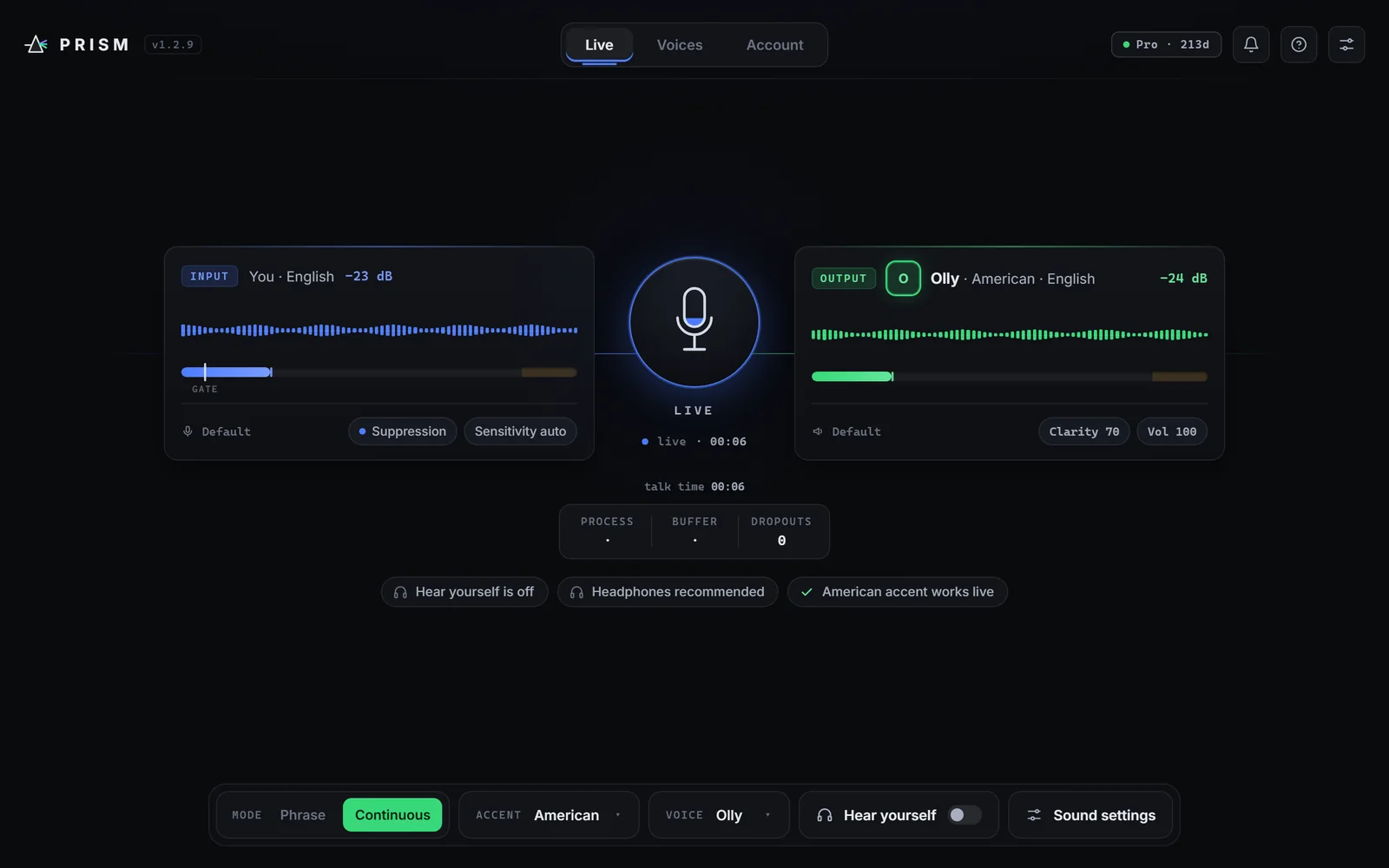
PRISM going live: your voice comes in on the left and Olly's voice goes out on the right
Use it in
Zoom Discord Google Meet Teams OBS Twitch Games
How it works

Talk normally. Everyone else hears the new voice.

There's nothing to learn. Speak the way you always do and PRISM takes care of the rest.

  1. 01

    You speak

    Into any microphone, at your own pace. PRISM listens to how you say things, not just what you say.

  2. 02

    PRISM changes it

    Your words come out in the voice you picked, with your rhythm and feeling still in them.

  3. 03

    Everyone hears it

    Choose PRISM as your microphone in Zoom, Discord, OBS or a game with a free virtual audio cable. Or just listen and record.

Two ways to talk

Live when you're talking. Phrase when it has to be perfect.

Continuous

For live conversation

PRISM changes your voice as you talk, so you can chat, stream and play without stopping.

  • Keeps up with you, with only a short delay
  • Sets itself up for your PC the first time you go live
  • Echo and noise suppression help keep room noise and your speakers out of the new voice

Best for calls, streams, games and anything live. Use headphones.

Phrase

For the cleanest result

Say a sentence, pause, and PRISM plays it back in the new voice with all the detail it can give.

  • With the accent on, it also picks up the new voice's speaking style, not just its sound
  • With the accent off, your own emotion and delivery carry through
  • Plays each sentence back once you finish it

Best for voice notes, recordings, dubbing and videos.

Inside the app

Everything in one window.

Pick a voice, make your own, clean the recording and tune the sound, all without leaving PRISM.

Voices

Pick a voice, or make your own.

Start with Olly, a voice nobody owns, or add voices from your own recordings. Before you go live, try any voice with your own voice and hear how you will sound.

  • Search, favourites and accent tags keep your library tidy
  • Each voice shows how much speaking style it has
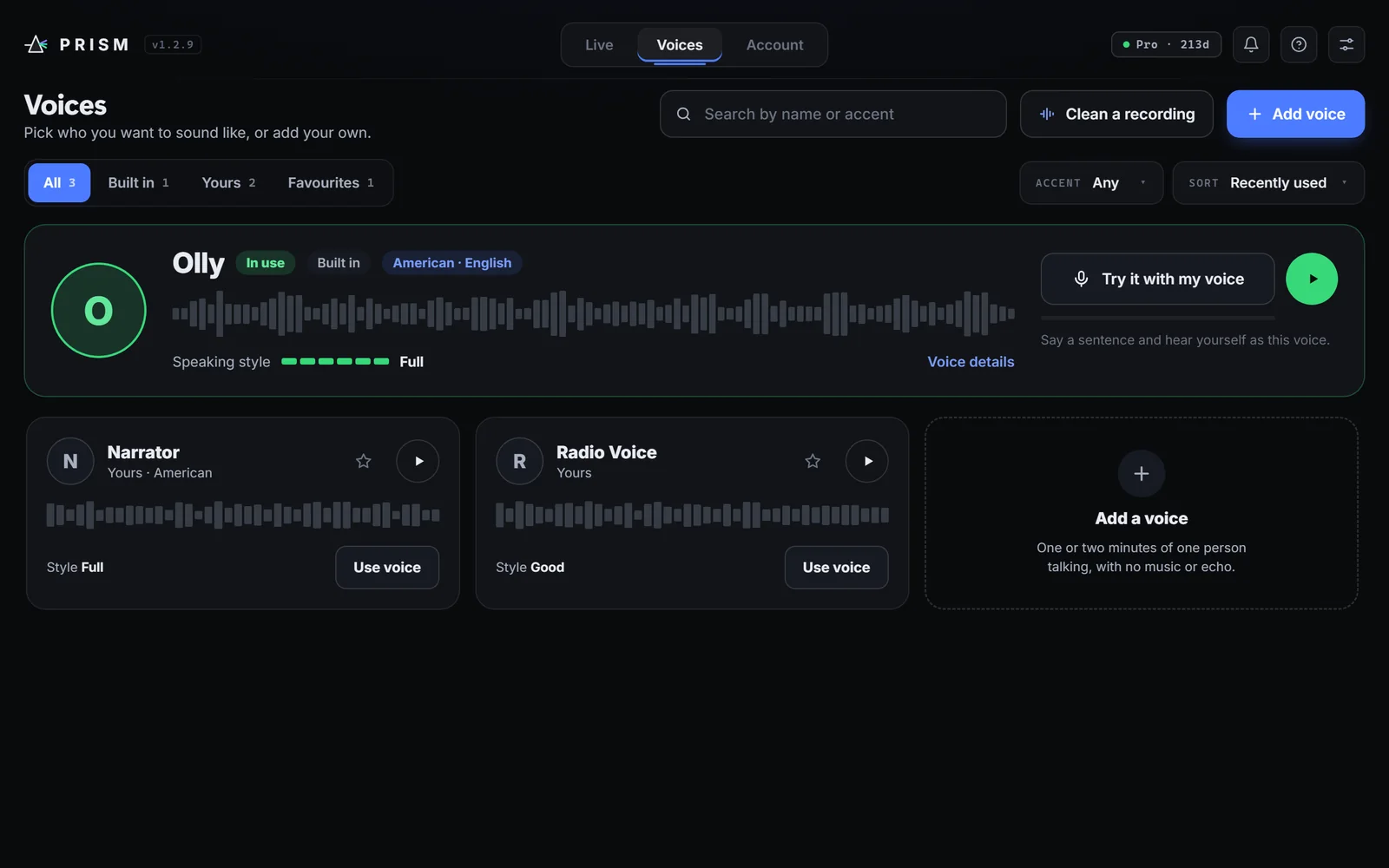
The Voices page in PRISM with Olly in use and two voices made by the user
Add a voice

Make a voice from a recording.

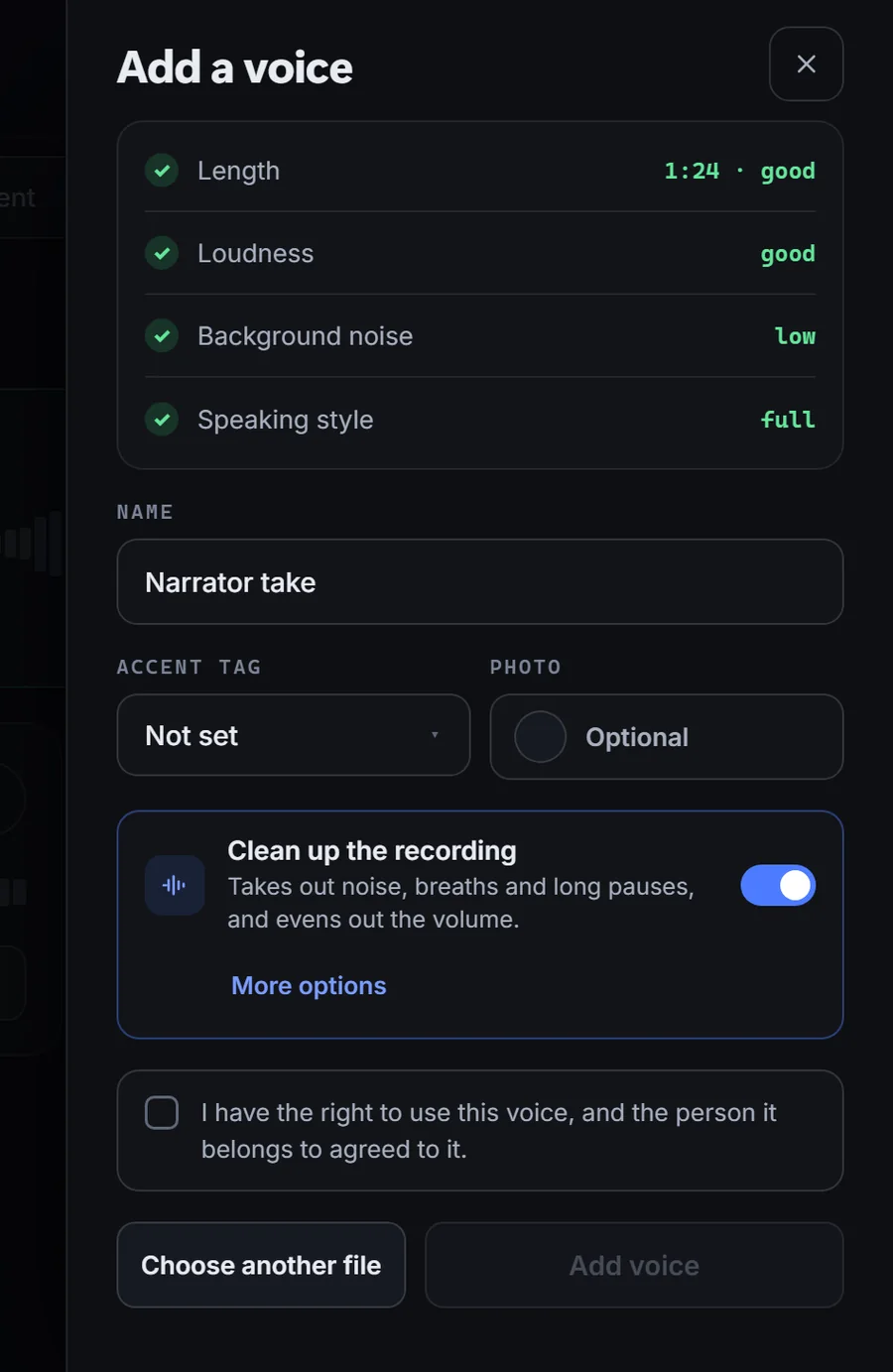
Choose a recording of one person talking. One or two minutes works best. PRISM checks the length, loudness, background noise and speaking style before it makes the voice.

  • Clean up the recording first with one switch
  • Only for voices you have the right to use
Adding a voice in PRISM: checks for length, loudness, noise and speaking style, with Clean up the recording turned on
Clean a recording

A clean recording makes a better voice.

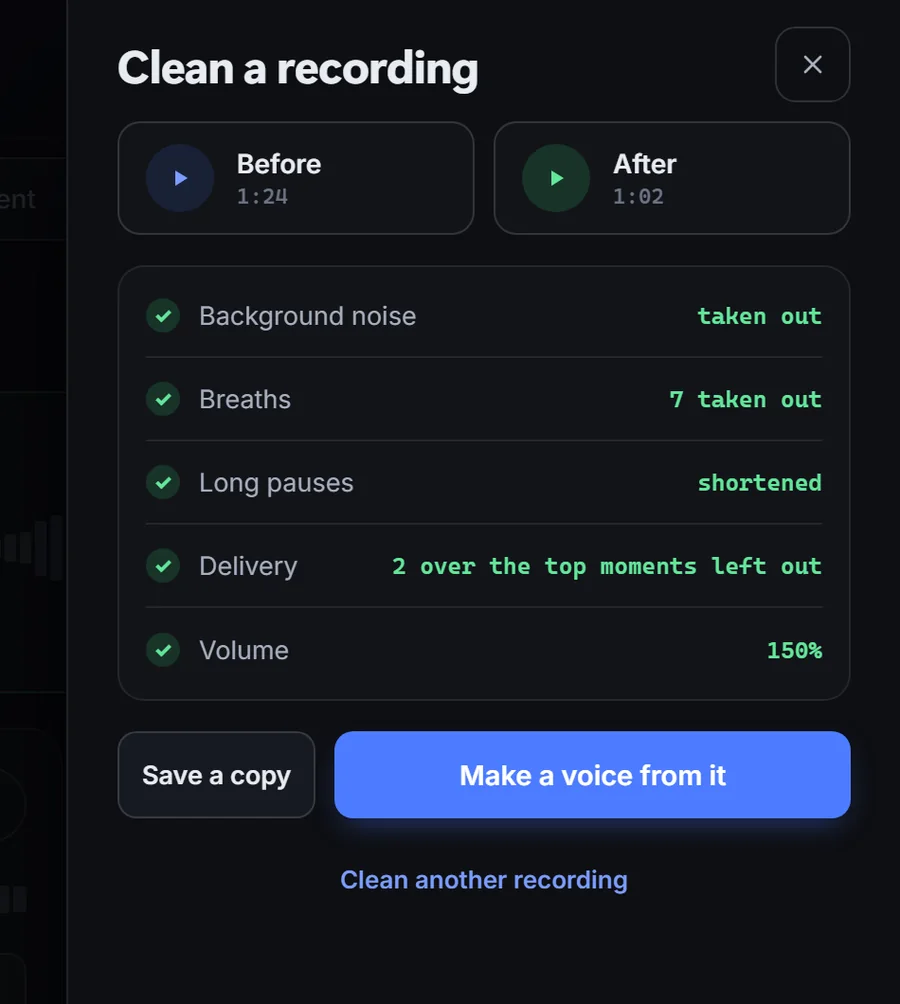
PRISM takes out background noise, breaths and long pauses, evens out the volume and leaves out moments that are over the top, so the new voice sounds natural.

  • Listen to the before and after
  • Make a voice from it, or save a copy
Clean a recording in PRISM: noise, breaths and long pauses taken out, volume raised
Sound settings

Tune the sound in one place.

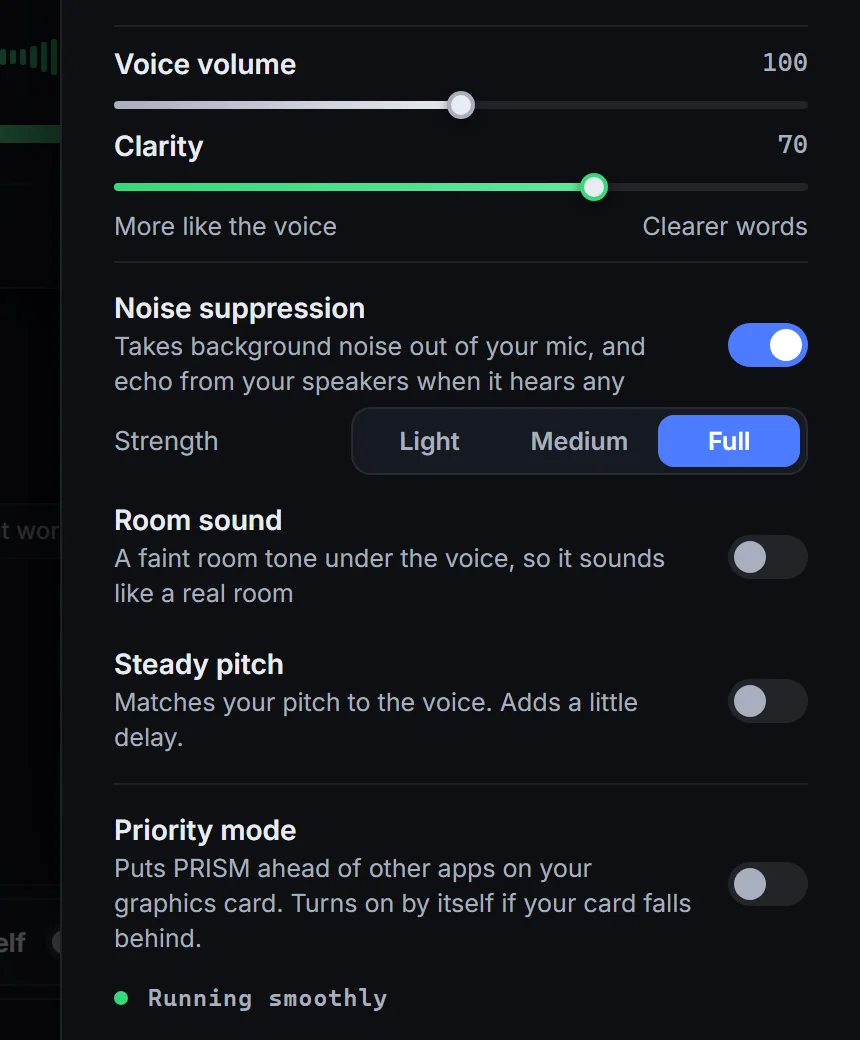
Noise suppression takes room noise out of your mic. Mic sensitivity follows your room by itself. Clarity balances the voice against clear words.

  • Priority mode puts PRISM ahead of other apps when your graphics card falls behind
  • Room sound and steady pitch when you want them
Sound settings in PRISM: voice volume, clarity, noise suppression, room sound, steady pitch and Priority mode
What you get

Made for real conversations.

Not novelty pitch shifting. Every plan includes all of it.

Your delivery, kept

A laugh, a whisper, a pause for effect. PRISM changes the voice and leaves the performance to you.

American accent

Switch on the American accent and your words come out with it, live or phrase by phrase.

A voice library

Start with Olly, or add your own from a short recording. One or two minutes of one person talking works best.

Private by design

Your voice is changed on your own PC. We never receive, record or store your audio.

Olly, a voice nobody owns

A made up voice for when you'd rather not sound like any real person, yourself included.

Set up for your PC

The first time you go live, PRISM picks the best setting for your graphics card and remembers it.

Get PRISM

Download for Windows.

Create an account in the app and your free trial starts right away: 3 days with every voice and feature unlocked. No card needed.

1Run the small installer, about 2 MB.
2It downloads PRISM for you, about 10 GB. If your connection drops, it carries on where it stopped.
3Open PRISM from the desktop shortcut and sign up. That's it.
What you need
Windows 10 or 11Any 64 bit desktop or laptop
An NVIDIA graphics card with 4 GB or moreGeForce GTX 10 series or newer, including the RTX 50 Series. The free trial lets you check yours.
About 16 GB of free disk spacePRISM takes about 10 GB once installed. Setup needs a little extra room while it unpacks.
HeadphonesBest for live mode, so the new voice doesn't loop back into your mic

No NVIDIA card? PRISM needs one today. Tell us what you have and we'll let you know if that changes.

Pricing

Try it free. Keep it if you love it.

Every plan includes everything. Pick the length that suits you.

  • 3 days free
  • No card to start
  • Renews only by card, and only if you choose

Every plan includes

  • Live and phrase modesTalk live on calls and games, or record sentence by sentence.
  • Every voiceAll built in voices, plus voices you make from your own recordings.
  • The American accentSound American while you talk.
  • All updatesEvery new version at no extra cost.
  1. Download PRISM and start your free trial. No card needed.
  2. Choose a plan in the app when you are ready. Your voices and settings stay.
  3. Pay by card in naira or US dollars, or with USDT. In Nigeria you can also pay by bank transfer or USSD.

You choose a plan inside the app when your trial ends. Pay by card (in naira or US dollars) or with USDT, and in Nigeria also by bank transfer or USSD. Only card payments can renew: monthly and yearly renew by card if you turn it on, until you turn it off. Every other payment covers one period at a time.

Use it responsibly

A powerful tool, with a clear line.

PRISM is for creativity, privacy and fun. It is not for fooling people.

  • Only use voices you have permission to use. Don't copy a real person's voice without their clear consent.
  • Never impersonate someone to deceive or defraud. Accounts used for scams are banned, and we cooperate with law enforcement.
  • We keep session records, never audio. When you go live we note the time, account, device, IP address and voice used, so misuse can be traced. Read the Terms.
Questions

Good to know.

Is there a delay?

A short one. Live mode keeps up with you well enough for calls, streams and games. Phrase mode waits until you finish a sentence, then plays it back.

What do I need to run it?

A Windows 10 or 11 PC with an NVIDIA graphics card that has at least 4 GB of memory (GeForce GTX 10 series or newer, including the RTX 50 Series), and about 16 GB of free disk space for setup. The installer picks the right version of PRISM for your card.

How do I use it in Zoom, Discord or a game?

Install a free virtual audio cable (VB CABLE works well), set it as PRISM's output, then choose that cable as your microphone in Zoom, Discord, OBS or your game. Everyone hears the new voice.

Is my voice sent anywhere?

No. Your voice is changed on your own PC, and we never receive, record or store your audio. We do keep basic account and session records, and details such as your graphics card model, to run the service and prevent misuse. The Privacy Policy lists everything.

How does the free trial work?

Sign up in the app and you get 3 days with everything unlocked, no card needed. When it ends, pick a plan in the app to keep going: one week, one month, three months, six months or a year.

Can I add my own voices?

Yes. Add a recording of one person talking (WAV, MP3, M4A and more). One or two minutes of clear speech works best, and PRISM can clean the recording for you first. You can add more audio later to make the voice more accurate. Only use voices you have the right to use.

Which accents are there?

American English, in both modes. In phrase mode with the accent on, PRISM also picks up the new voice's speaking style. With the accent off, you keep your own accent and delivery. It works best on clear speech, and very strong accents may keep a little of their character.

How do I cancel?

In PRISM, open Account and turn off Auto renew. Or email support@prizmvoice.com from your account's email address and we'll stop it. You keep access until the end of the period you paid for. Bank transfer and USDT payments cover one period and never renew on their own.

Hear yourself as someone new.

Set it up once, talk the way you always do, and keep everything that makes you sound human.